JavaScript
Previously I read an article regarding JavaScript and another one regarding HTML.
JavaScript, it is so wonderful that not only enhances the HTML interaction, (e.g. jQuery), it also makes a revolution of the system architecture design (e.g. AngularJS, ReactJS with Babel). The Babel JavaScript compiler is so amazing that it can transform the JavaScript to EcmaScript 6 with JSX feature. JSX is actually cannot be interpreted by our current web browser, but with the Babel, it makes JSX possible.
Facebook chat list
I am not a Facebook fervent user. I use it because of some of my friends are using it.
So, if you want to enable your “available to chat” status to your group of close friends or special group of friends,
- Go to Friends an create a list that you want to chat with.
- After creating the list, add your close friends.
- Now, turn on the Chat.
- Go to Chat Options > Advanced Settings
- Choose “Turn off chat for all friends except…”, and add in your target chat.
[caption id=“attachment_1168” align=“aligncenter” width=“300”]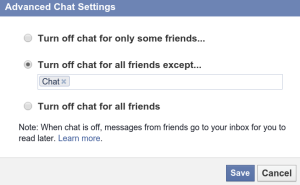 Custom chat list in Facebook[/caption]
Why not Internet Explorer?
Firstly, I want to state that I am totally anti (dislike) Internet Explorer. There are several reasons that I don’t like Internet Explorer.
Internet Explorer version less than 9 has a lot of problems with CSS. As a result, as a developer, developing the webpages for among IE and other web browsers is exhaustive. In order to make the compatibilities, the CSS is almost web browser dependent. Besides that, CSS3 which is supported by most of the modern web browsers, does not work well in Internet Explorer. Luckily there is a trick using PIE. But this is not the best solution.
Bookmarks, like (including +1 and favourite), and Zotero
Long time ago, I used to use a text file to collect all my favourite websites. This is because I was using Internet Explorer, and Firefox was not yet introduced. I totally disliked the “favourite” files in IE. Besides that, I cannot bring my favourite websites to any other computers.
Then, after using Firefox, I started building up my bookmarks. This is really great because the bookmarks can be easily exported and imported with a single file.
Firefox 15 with built-in PDF plugin
Firefox, though I like it, I still feel a lot of limitations of using it, especially reading the PDF using the plugin from Adobe Reader. This is really a drawback. Because the plugin in Linux I feel that it is not very stable. That is why, normally I open the online PDF with Chromium, because Chromium (Google Chrome) has built-in PDF plugin.
Now, Firefox 15 has a built-in PDF plugin as well. By default, it is disabled. So, we need to enable it manually.
Firefox or Chromium (Google Chrome)
Yes, again web browser. I am using Firefox. Only sometimes Chromium (Google Chrome). Mainly Firefox. If someone ask me, which one I choose, I definitely answer Firefox. But, if someone ask me, which one I prefer, then it will be difficult to answer.
Firstly, I would like to go through why I choose Firefox as my primary web browser.
Because of DownThemAll. There is no alternative extension in Google Chrome like DownThemAll. Why I like DownThemAll so much? I use DownThemAll with GreaseMonkey to download my favourite mangas (comics). This is something Google Chrome still cannot do it, based on my current knowledge. GreaseMonkey generates the links, right-click, then I DownThemAll.
Comic Downloader alpha stage
I wrote several Greasemonkey userscripts. However, the Javascript has its own limitation for security reason, especially when a website uses scripts from cross domain. As a result, Javascript cannot get the information, and my userscript fails to work. Therefore, I start another project, in order to solve the cross domain problem using Python, and targeted on Linux (Ubuntu).
The current development stage is alpha, and targeted only on one website, since the other websites I frequently visit still work with Greasemonkey userscript. The alpha stage of Comic Downloader is currently work in command-line. GUI feature will be added in future with PyGTK. Currently, the command-line is able to solve my problem for offline comic reading.
My favourite Thunderbird add-ons
Since I tried on Evolution of Ubuntu, an email client just like Microsoft Outlook, with PIM (Personal Information Manager) features, allows using IMAP, and allows synchronization. I really like it. So I tried to install Evolution for Windows. However, Evolution for Windows cannot work properly on Windows 7. Then, I need to switch back to Thunderbird. Since I like the feature of PIM and the synchronization with GMail and Google Calendar, I have installed following add-ons:
Move my projects to SourceForge project hosting
I just move my Prayer Clock project to SourceForge.net project hosting. Have a look here.
Huawei Mobile Broadband, Ubuntu 10.04, Celcom service, and HP Mini netbook
Huawei Mobile Broadband, which I bought about 2 years ago, is failed to run properly on my HP Mini 1000 series with Ubuntu 10.04. It will keep trying to connect to internet, yet failed. And I also found a “MOBILE_CONNECT” icon on the desktop. If I tried to click it, it will immediately missing.
So, to solve this problem,
- I right-click the NetworkManager Applet,
- Edit Connections…
- Goto Mobile Broadband tab
- Click Add button
- Then it will show the Huawei broadband device
- Continue the steps for my service provider, which is Celcom
- Can connect to internet properly.
I do this whenever I cannot connect to internet properly using the Huawei Mobile Broadband.