Prayer Clock 0.0.6
Just to announce that the Prayer Clock 0.0.6 is released.
I have redesigned the algorithm and the data structure. Besides that, some features are added such as “Prayers” item that allows the user to show different prayers. The followings are some screenshots:
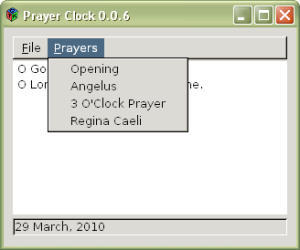
GTK+ in Windows.
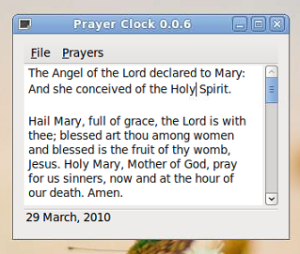
GTK+ in Ubuntu Linux. Very nice, right?
Since Easter is coming, hopefully I have time to add in Divine Mercy Novena.

Prayer Clock
Written by using C and C++, depends on GTK+ and Expat. I spent about 3 days to study GTK+ and Expat since never used them before. I wrote this application because sometimes, I want to say a prayer, especially Angelus. But I need the prayer to read and also a reminder. So, I decided to wrote this program, at the same time I can also learn about GTK+ and Expat. And I decided to open source it as a contribution to Catholics.
MinGW and Cygwin
I am a software developer. I like cross-platform development. And I prefer lower level programming language like C. My OS is Windows. Thus, I normally use Visual Studio Express Edition to compile the source code. But using Microsoft Visual C++ compiler is not a good idea for cross-platform development, because it highly depending on the Microsoft platform. Besides that, it doesn’t have C99 standard.
So, the best cross-platform C and C++ compiler is GCC (GNU Compiler Collection). However, it is used in Unix-like OS. Yet, there are two projects porting GCC to Windows: MinGW and Cygwin. These two projects provide us GCC to compile cross-platform source code such as libjpeg, libpng, zlib, etc. This indicates that, we can also write our own cross-platform source code and compiled by using GCC in Windows and other Unix-like OSes.
Regular expression search and replace of jEdit and Notepad++
I just found that there are some differences for the regular expression in search and replace for both jEdit and Notepad++. Both of them are great text editors. jEdit requires Java Runtime Environment. Notepad++ is based on Scintilla, so Notepad++ regular expression is based on Scintilla.
So, what are the differences I found? Notepad++ regular expression for search and replace, we can use \1, \2, \3 to \9 syntax. For jEdit regular expression, it uses $1, $2, $3 to $9 syntax.
Managing your data
I really like Unix philosophy:
Data dominates. If you have chosen the right data structures and organized things well, the algorithms will almost always be self-evident. Data structures, not algorithms, are central to programming. [link]
Yes, I used to install all the programs to the Windows > Program Files. And I found that the data is always saved in My Documents. And the settings of the programs are stored in user profile application data. This is very annoyance when I needed to format and reinstall the Windows. Because My Documents is in C:. Though we can move My Documents to other location, I did not do so. Because not everything in My Documents is what I want. Most of them just created by the programs. Very annoyance.
Batch install hotfixes for Windows XP
Since Windows XP Service Pack 3 released, we might need to install the critical hotfixes ourselves. There are several ways to install hotfixes. We can search for “windows offline update” from internet.
But, I personally prefer go to The Software Patch, and download manually. Because I can download whatever I like. However, installing those hotfixes manually is troublesome. Then I wrote a batch file to install the hotfixes automatically. But I need to update the batch file whenever I download new hotfixes. Finally, I found a good solution.
Human learning and machine learning
One day, my junior asked me, how to improve programming skill. Then I told her, only practicing a lot and a lot. Then, I told her about how can we learn like machine learning.
Just like machine learning (such as Artificial Neural Network), we need a lot of training samples. More samples will produce better result. So, as we learn, we also need to have a lot of samples. Then, the learning process need to be repeated. After enough learning, a person can surely categorise the new sample. Because, even a machine can do so. For example, an expert is able to appraise the fake painting and the real painting. This is because he or she has many experiences.
C/C++ libraries
A programming language is only a language. The language allows the programmer to communicate to a computer. We can ask a computer to print a “Hello World!” in a console, or doing some other complex things.
When we are writing a program, especially C language and C++ language, we always need the libraries. C language has its standard library, C Standard Library. The standard library contains standard I/O (stdio.h). That is why we can print a “Hello World!” in a console. And C++ has also standard library, C++ Standard Library. Like C Standard Library, C++ Standard Library contains “iostream”, “string”, etc. Furthermore, C++ language also uses STL (Standard Template Library). STL contains vector, stack, queue, etc. These libraries reduce our work when we are writing a program. These libraries are so basic that we don’t need to know how they are written.
DirectShow and DirectX
I use Visual Studio 2008 Express and Windows SDK 6.1 (Microsoft Windows SDK for Windows Server 2008 and .NET Framework 3.5). Since I am doing some DirectShow application, and using Sample Grabber filter, “qedit.h” is needed. However, this “qedit.h” includes a “dxtrans.h” header file. I installed DirectX SDK February 2007. There is no problem during compilation.
However, my friend uses newer version, DirectX SDK June 2008, and the coding cannot be compiled. This is because “dxtrans.h” is missing. Therefore, I go to search the solution. You can find the solution here.
Free C++ IDE: Visual Studio Express 2008
If you are targeting Windows platform, I suggest using Visual Studio Express 2008. To make it fully function, you will need also Windows SDK (for Windows Server 2008 and .NET Framework 3.5). Both are very large files. If you want to download for offline installation, I suggest using a download manager, and use only one thread, do not use multi-segmented (or multi-thread) to download the file.
Unlike Windows Server 2003 SP1 Platform SDK, the Windows SDK (version 6.1) provides the project solution of DirectShow BaseClasses. So, you can compile the DirectShow using Visual Studio C++ Express 2008. Besides that, you can also download DirectX SDK.