Image editors reviews
I like GIMP (Portable). But it is an advanced image editor, and need some times to load the application. Thus, it is not a good idea to run the GIMP for doing tiny works. So, I am looking some other image editor, free and cross-platform (better if open source).
One of the popular image editors is Paint.NET. I tried it, it is nice and lighter than GIMP. But it depends on .NET Framework. I don’t like .NET Framework because it is “heavy” (required a lot of disk space). Thus, I want to find alternative.
Ubuntu Netbook Remix part 2
After a long time, I successfully setup the Ubuntu Netbook Remix to access the Wireless Network Connection (WiFi). Next post I will share about what I have experienced. The following is the screenshot of UNR:
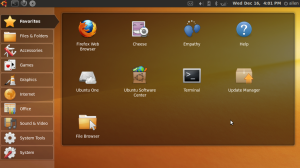
I haven’t tried Windows 7. But I am satisfied with Windows XP. And now I got Ubuntu, and experience a new different OS. Good feeling! Feeling good!

Trying Ubuntu Netbook Remix
HP Mini 1109TU, Small and light. But netbook is not laptop, the screen resolution is smaller. Thus, cannot play some of the games. That is why there is HD (High Definition) HP Mini.
Since my netbook have most of the software similar to my laptop, yet it cannot play the games like my laptop. The function of the netbook just become a redundancy yet deficiency. Since my works are primary done using my laptop, so I want to make something special to my netbook.
Reviews of SRWare Iron and ChromePlus
I have tried both SRWare Iron and ChromePlus, though not using as primary web browser.
I compare the both software based on my personal preference:
| ChromePlus | SRWare Iron |
|---|---|
| Chromium Beta (4.0) | Chromium 3.0 |
| Bookmark syncing | No bookmark syncing |
| Install extension | Cannot install extension |
| Mouse gesture | No mouse gesture |
| Cannot play WMA | Can play WMA with Windows Media Player |
| Clear history and etc on exit | Cannot clear history on exit |
| But difficult to empty cache, needs to go to option | Easier to clear cache from the “Wrench” iron |
| AdBlock Plus | No AdBlock |
| Able to disable/enable Javascript and Java | Cannot disable Javascript and Java |
Because of the WMA problem, I prefer SRWare Iron. But I think these features can all be integrated in future, because Chromium 4.0 is still in beta version.
Managing your data
I really like Unix philosophy:
Data dominates. If you have chosen the right data structures and organized things well, the algorithms will almost always be self-evident. Data structures, not algorithms, are central to programming. [link]
Yes, I used to install all the programs to the Windows > Program Files. And I found that the data is always saved in My Documents. And the settings of the programs are stored in user profile application data. This is very annoyance when I needed to format and reinstall the Windows. Because My Documents is in C:. Though we can move My Documents to other location, I did not do so. Because not everything in My Documents is what I want. Most of them just created by the programs. Very annoyance.
Google Chrome alternatives
I have tried Google Chrome. Sure it is nice, because it is clean and simple. But, I still prefer Firefox as the default web browser. So, if you are interested in Google Chrome, and still using other default web browser, you can try the followings:
Portable Chrome (Chromium)
SRWare Iron
I am now using Iron portable version. Very nice.
One-click hosting downloaders
If you want to download the file from Rapidshare or Megaupload frequently, a suitable download manager is needed. This type of websites for file hosting is called one-click hosting. So, I have tried several downloaders, not only support Rapidshare and Megaupload, but also other sites like hotfile.com, badongo.com, sendspace.com, etc.
Universal Share Downloader - Russian freeware. First file hosting downloader I used. Good.
RapGet - I always failed to download the file using it.
RDesc - Spanish freeware. Not bad. Just as good as Universal Share Downloader.
JDownloader - Just found it recently. Very good. Requires JRE.
Windows managment tools for XP
When we are busy using our computer, normally we will open a lot of windows, web browser, word processor, file explorer, audio player, video player, PDF reader, etc. Especially, we need to open a lot of word processors and refer to one another.
There are 3 tools I used in Windows XP to help me for the window management.
allSnap - All the windows has the snap feature when we resize them. So, you can adjust them with better arrangement.
Taskbar Shuffle - When we open a lot application, our taskbar will be full of items. If we switch off the “group similar window” feature, then there will be a lot of items in taskbar. This tool allow us to drag and drop our own taskbar item manually, so we can put two word processors side by side.
TaskSwitchXP - Alt-tab replacement. Too many applications, alt-tab might be useless, because we need to tab tab tab to the application. But still don’t get what we want, because we can only see the icons. This tool allows you to preview the application and integrate with the mouse.
Visual Tooltip - Mouse over to the taskbar item, a thumbnail will be shown. Just like Vista.
Another Firefox notetaking extension
I found that Evernote is not very suitable for me. Firstly, it has upload limit. Secondly, it cannot export to HTML through the website, unless we download and install the desktop application.
So, now I am trying Zotero. It cannot export to HTML, but it has the function to “generate” the HTML. Just like Google Notebook. And it also provide sync function to the Zotero server.
Firefox 3.5 with some new addons
Just upgrade my web browser Firefox to version 3.5. Because it is 3.5, some extensions (addons) cannot be used. The Google Notebook extension cannot be used. This is a bad news for me. Because the development of Google Notebook is stopped. Thus, no more Google Notebook extension for Firefox 3.5.
Google Notebook is very nice for note-taking. Because, we do not need to bookmark everything because of part of the page we like. Sometimes when we are surfing net, we might like some quotes. Using Google Notebook, we can highlight the quotes, and save it.