Managing contacts and calendar
I am always looking for a good solution (not a software, but a solution) to manage all my contacts and calendar. Actually I separate both of them, even they are under PIM (personal information management).
I was using an excel file to manage all my contacts. But we know, a file is different from an application, the interface is not usable, and I had the difficulty to find the contacts that I want.
My favourite Thunderbird add-ons
Since I tried on Evolution of Ubuntu, an email client just like Microsoft Outlook, with PIM (Personal Information Manager) features, allows using IMAP, and allows synchronization. I really like it. So I tried to install Evolution for Windows. However, Evolution for Windows cannot work properly on Windows 7. Then, I need to switch back to Thunderbird. Since I like the feature of PIM and the synchronization with GMail and Google Calendar, I have installed following add-ons:
Now I think ChromePlus is better
Previously, I compared ChromePlus and SRWare Iron. Today, I think ChromePlus is better. Google Chrome 6.x beta already released. But SRWare Iron still using Chromium 4.x. That is why, I tried out ChromePlus, which uses Chromium 5.x. And there is no problem to play the WMA files. So, I choose ChromePlus now.
Besides that, there is also Linux version for ChromePlus.

Prayer Clock 0.0.6
Just to announce that the Prayer Clock 0.0.6 is released.
I have redesigned the algorithm and the data structure. Besides that, some features are added such as “Prayers” item that allows the user to show different prayers. The followings are some screenshots:
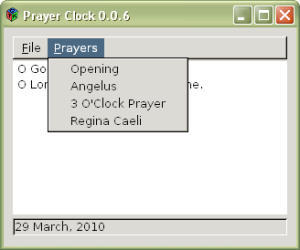
GTK+ in Windows.
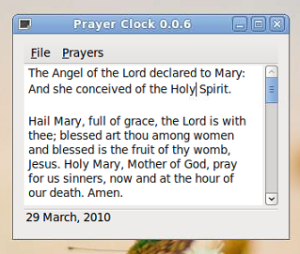
GTK+ in Ubuntu Linux. Very nice, right?
Since Easter is coming, hopefully I have time to add in Divine Mercy Novena.
From MS Office to OpenOffice
I already switched from MS Office to OpenOffice for some time. But most of my friends and colleagues still use MS Office. At my workplace, most of the people are using MS Office. Some of them use MS Office 2007. I introduced OpenOffice to friends, but switching from one environment to another needs some time for adaption. So, normally they reject.
Why I want to use OpenOffice? Firstly, it is free. You can get it without paying any money, and do not have any license issue Secondly, it is open source. If you are developer, you can study and contribute. Thirdly, it is cross-platform. If you are not working with Windows, but Linux or FreeBSD, then how do you use MS Office? May be you will say that, “Why Linux? Why FreeBSD? We have Windows already.” Very good, you are very loyal, then go ahead. For me, learning more than one skill is always better. Fourthly, OpenOffice can satisfy my works: documents, spreadsheets, and presentations.
Prayer Clock
Written by using C and C++, depends on GTK+ and Expat. I spent about 3 days to study GTK+ and Expat since never used them before. I wrote this application because sometimes, I want to say a prayer, especially Angelus. But I need the prayer to read and also a reminder. So, I decided to wrote this program, at the same time I can also learn about GTK+ and Expat. And I decided to open source it as a contribution to Catholics.
Image editors reviews
I like GIMP (Portable). But it is an advanced image editor, and need some times to load the application. Thus, it is not a good idea to run the GIMP for doing tiny works. So, I am looking some other image editor, free and cross-platform (better if open source).
One of the popular image editors is Paint.NET. I tried it, it is nice and lighter than GIMP. But it depends on .NET Framework. I don’t like .NET Framework because it is “heavy” (required a lot of disk space). Thus, I want to find alternative.
Ubuntu Netbook Remix HP Mini 1109TU Wireless network driver
The problem I faced on UNR on HP Mini 1109TU is the Wireless Network driver. The Wireless device of HP Mini 1109TU is Broadcom Corporation BCM4312 802.11b/g.
After the installation of UNR Karmic (9.10), there is no Wireless Network support. I cannot access internet with WiFi. So, the network cable is needed for internet connection.
I have tried several ways to enable the Wireless Network driver. First, run the System > Administration > Update Manager to update everything (remember to find the fastest repositories). After everything is updated, reboot Ubuntu.
Ubuntu Netbook Remix part 2
After a long time, I successfully setup the Ubuntu Netbook Remix to access the Wireless Network Connection (WiFi). Next post I will share about what I have experienced. The following is the screenshot of UNR:
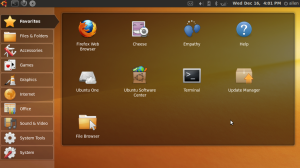
I haven’t tried Windows 7. But I am satisfied with Windows XP. And now I got Ubuntu, and experience a new different OS. Good feeling! Feeling good!
Trying Ubuntu Netbook Remix
HP Mini 1109TU, Small and light. But netbook is not laptop, the screen resolution is smaller. Thus, cannot play some of the games. That is why there is HD (High Definition) HP Mini.
Since my netbook have most of the software similar to my laptop, yet it cannot play the games like my laptop. The function of the netbook just become a redundancy yet deficiency. Since my works are primary done using my laptop, so I want to make something special to my netbook.