Xfce4 4.20 upgrade issue on font size
With the recent upgrade of Xfce4 4.20, I was facing the font size issue on my laptop. I am using icewm . And the upgrade causes my fonts become too small. But some applications are too big, like Brave and FreeFileSync. I spent some time to fix this. And this is my final solution,
Allow xfsettingsd at startup,
xfsettingsd --daemon -D
And use xfce4-appearance-settings, at the Fonts > DPI, enable Custom and set the value to 120 as in .Xresources . The effect is immediate. This solves the font size for all applications.
Logitech M590 mouse and Linux 6.11.4
Due to the recent upgrade of Linux kernel to 6.11.4, my bluetooth mouse (Logitech M590) cannot connect. I tried many times, and sometimes I can connect, but most of the time it fails. There were several related posts: here and here.
Since my storage doesn’t have enough space to install Linux LTS, I can only wait for the fix from Linux. While waiting for the fix, I remembered that M590 allows to use a USB receiver. As a result, I installed ltunify package and now it works. The only drawback is that one of my USB ports is occupied.
Arch Linux kernel and NVidia recent bugs
I was facing frequent freeze of the laptop recently. The discussion can be found here.
Basically, there are two issues, one is the Linux kernel, and the other is the NVidia driver update.
Linux kernel causes some Oops in the kernel, probably related, I don’t know. The result is that I can’t shutdown my laptop because it cannot unmount /home and /tmp. To resolve this, I upgraded the Linux kernel to 6.7.8, and added zswap.enabled=0 and numa=off as the kernel parameter, in GRUB. I am not sure which one is the actual action that solve the issue.
Arch Linux Xorg failed to run
Today I updated the packages, then rebooted, then the machine got stuck at
[Started] Accounts Service
Seriously, I have had no issues with my laptop recently. And this makes me nervous. It will be troublesome if I have to boot into the Arch Linux LiveUSB. But luckily, searched online, and someone mentioned to change to another TTY with Ctrl+Alt+F2.
Wheew. I still can log in with the command-line. And then I noticed that, the issue must be NVidia driver related.
Android playing iOS MOV video
I am using an Android phone, specifically Vivo. I found that when I play the MOV video transferred from iOS, only sound is able to be played properly but the picture is not showing.
None of the solutions from the Internet helped me to solve my problem. After trial and error, I found that the MOV file can be converted to MP4 format using ffmpeg with some parameters. Eg,
fmpeg -i input.MOV -c:v libx264 -c:a aac -vf "scale=720:1280,fps=29" -ac 1 -x264opts "ref=0:cabac=0:b_pyramid=0:bframes=0" -profile:v baseline -pix_fmt yuv420p output.mp4
Based on my experience, the most crucial parameter is “-pix_fmt yuv420p”, so the MP4 video is 8-bit depth.
Switching from Openbox to IceWM
Bye-bye Openbox, welcome IceWM.
Due to the recent upgrade of glib2 on Arch Linux, it crashes my Openbox when I am running Wine or Proton. Downgrade to 2.74.6 is not a solution, because Nemo, Caja, Nautilus are using 2.76.0.
As a result, I have to find an alternative. From Wikipedia, I found that LXDE can be configured with other window manager rather than Openbox, eg Fluxbox, IceWM, or Xfwm.
I tried Xfwm, but it fails to run. Probably needs extra configuration, but I didn’t continue trying. I tried Fluxbox long time ago, can’t remember the feature. Then I found that, compare to Openbox, IceWM is still in development. Hence I decided to try IceWM.
Migrate to SSD
In my previous post, I mentioned I have boot issue. Then I asked in Arch Linux BBS, and I got some useful advice from other users. As a result, I contacted a computer shop in my town, in order to get a hard drive (HDD). However, the shop doesn’t have 7200 rpm HDD. Then he suggested SSD to me, which is 1T storage. The SSD now is much cheaper comparing to two years ago.
Med: Experimental feature
I just tested with my new experimental feature for Med (Linux Memory Editor) on Sea Dogs, i.e. Custom Scan.
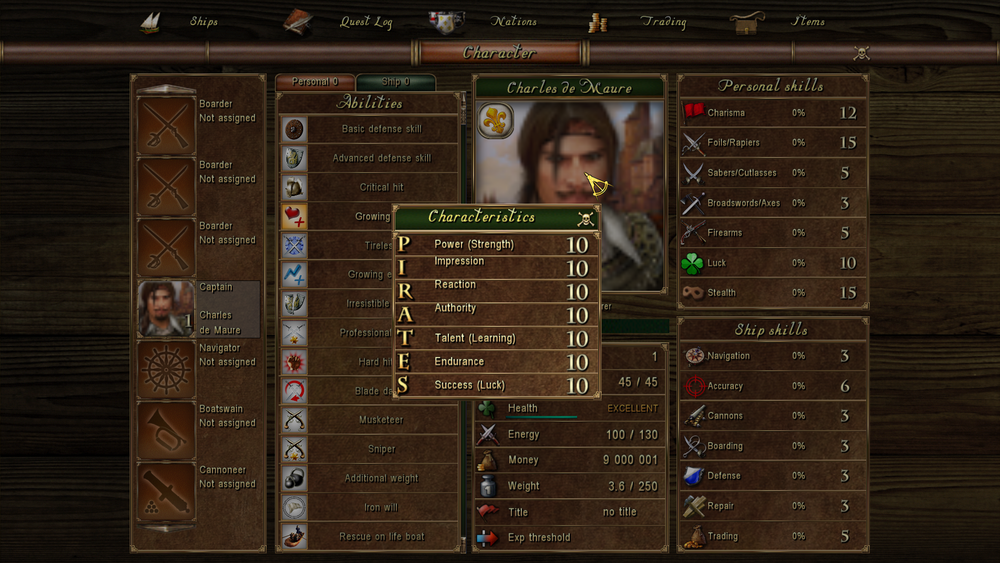
Sea Dogs is very difficult to do memory editing, as the values are stored in string. Luckily someone wrote a superb guide on how to do memory editing, which can be found here.
But the problem is that, the guide is written for CE (Cheat Engine). Unfortunately, CE is for either Windows or Mac. And to cheat in Sea Dogs, need to use “Group Search” feature of CE. WTF is Group Search?
LightDM background image
Recently my old laptop, due to some unknown configuration, it shows a background image in the LightDM login. It is annoying, and it is user specific. Meaning, if I choose another user, the background image will be changed to black background.
Searched for the solution on Internet, most of links are about gsettings, or edit the image in /etc/lightdm/lightdm.conf. But none of the related to my issue.
Finally, I found the solution. The problem is not LightDM itself, but related to AccountsService.
Patch Wine and supports both 64-bit and 32-bit
We can build Wine that supports both 64-bit and 32-bit.
The below shows the example that involves patch of a specific Wine version. Sometimes official or latest Wine just doesn’t work. And the patches can be found in the bug report attachment.
Download a patch from Wine bug report, and download the source code. Extract the source
tar xJf wine-4.2.tar.xz
patch -u -p1 < ../swshader_ivb.patch
To build Wine that can work on both 64-bit and 32-bit, we can follow this.