Review of Wubi input method and Cangjie input method
I learnt Cangjie input method before. Difficult to learn, difficult to memorize. Give up finally. Cangjie input is target on Traditional Chinese characters.
Recently, I tried Wubi input method, which is target on Simplified Chinese characters. Compare to Cangjie, it is easier to learn, easier to memorize. Not because the poem, but the rule of stroke layout on the keyboard is systematic. And I am learning Wubi 86 version.
So, using these input method, I can type the Chinese character without knowing how to pronounce the word. It is an alternative input method I think I need to learn.
Password Cipher with GUI
Password Cipher which I have written was in console mode. To make it more usable, I port it into Java, then build a simple user interface. For more detail, please read here.
[caption id="" align=“aligncenter” width=“320” caption=“Password Cipher Java”]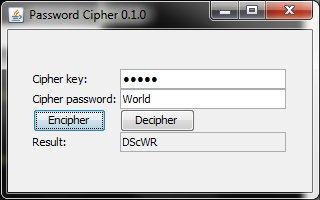
My first Greasemonkey script
Finally, I wrote a Greasemonkey script. The script is target on a Chinese comic website. You can download the script here. I wrote the script because the links are not named in sequence. To offline read the comic, I would like to download the comic first. Then I can read the comic offline. After that, I can delete the comic.
But the name are not in sequence, I cannot download the comic using batch downloading. Thus, writing this script to produce the link, then from the link, I can download the comic with any download manager.
My favourite Thunderbird add-ons
Since I tried on Evolution of Ubuntu, an email client just like Microsoft Outlook, with PIM (Personal Information Manager) features, allows using IMAP, and allows synchronization. I really like it. So I tried to install Evolution for Windows. However, Evolution for Windows cannot work properly on Windows 7. Then, I need to switch back to Thunderbird. Since I like the feature of PIM and the synchronization with GMail and Google Calendar, I have installed following add-ons:
Move my projects to SourceForge project hosting
I just move my Prayer Clock project to SourceForge.net project hosting. Have a look here.
Regular expression, find and replace using Unix tools
I need to add some text to a lot of text files. Previously, I used jEdit to perform regular expression for several files. But currently, I need to add the text for about 120 files. In order to do this, I tried using Unix tools, “sed”, “grep”, and “xargs”.
Firstly, I tried MSYS, yet it fails. Because the “sed” version was too old. Then, I used Cygwin.
My problem was to add the following text to the text files:
Try out Ubuntu, Wubi, and Portable Ubuntu Remix
Ubuntu, in my opinion, is a great Linux distribution. There are several ways to let you try out Ubuntu. After download the CD, I can burn it to the CD and boot from the CD. I can try Ubuntu as a LiveCD. I can also boot it from a USB pendrive like a CD.
When installation, I can create a new partition on my harddisk. I can install it on the logical partition and boot from there. Unlike FreeBSD, which needs to be installed on a primary partition. Not only that, I can also install Ubuntu side by side with the same partition with other OS (such as Windows). This is special.
Installing CVS on Ubuntu 10.04
I found the following message when I was trying to install CVS on Ubuntu 10.04 with synaptic,
Please insert the disk labeled: Ubuntu 10.04 LTS _Lucid Lynx_ - Release i386 (20100427.1) in drive /cdrom/
I am not sure why is this message appears. But my Ubuntu 10.04 was upgraded from Ubuntu 9.10 with the alternative CD. Fortunately, I got the CD image. Thus, to solve this problem, I mount the alternative CD to the “/cdrom/” drive. Then, there is no problem for the installation.
Huawei Mobile Broadband, Ubuntu 10.04, Celcom service, and HP Mini netbook
Huawei Mobile Broadband, which I bought about 2 years ago, is failed to run properly on my HP Mini 1000 series with Ubuntu 10.04. It will keep trying to connect to internet, yet failed. And I also found a “MOBILE_CONNECT” icon on the desktop. If I tried to click it, it will immediately missing.
So, to solve this problem,
- I right-click the NetworkManager Applet,
- Edit Connections…
- Goto Mobile Broadband tab
- Click Add button
- Then it will show the Huawei broadband device
- Continue the steps for my service provider, which is Celcom
- Can connect to internet properly.
I do this whenever I cannot connect to internet properly using the Huawei Mobile Broadband.
AddThis or ShareThis bookmarklet
Too many addons for Firefox? Using AddThis or ShareThis addons? Alternative to the AddThis or ShareThis addons, bookmarklet. Try them out: