Installing Flash plugin in Linux
I tried to install Flash in Ubuntu. But there is a problem when installing “flashplugin-installer”. I cannot finish download the installation file from Ubuntu server. So, I tried alternative way to install Flash plugin.
I go to Adobe website, and download the Debian package. Then
sudo dpkg –install [filename].deb
Right, now can view Flash in web browser.

From Visual C++ to MinGW/MSYS
Now it is the time to move from Windows to cross-platform, as a developer.
I was using Visual Studio Express Edition (freeware) for Windows development. Now I am using MinGW with MSYS. Cause GCC is a cross-platform compiler. Familiar with GCC allows me to develop cross-platform application. There are a lot of software libraries can be compiled with MinGW.
Using Visual Studio Express Edition, we do not have MFC for GUI development. However we can use Win32 API to create the GUI widget. But this indicates that our source code is highly depending on Windows platform. There are a lot of alternatives for GUI development, such as GTK+, Qt, wxWidget, FLTK, etc. Why using these libraries? If you are depending on these libraries, if these libraries are cross-platform, then your source code will be cross-platform also.
Prayer Clock 0.0.6
Just to announce that the Prayer Clock 0.0.6 is released.
I have redesigned the algorithm and the data structure. Besides that, some features are added such as “Prayers” item that allows the user to show different prayers. The followings are some screenshots:
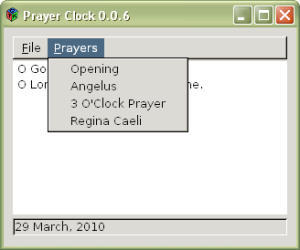
GTK+ in Windows.
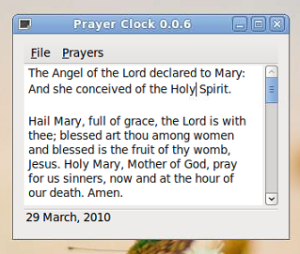
GTK+ in Ubuntu Linux. Very nice, right?
Since Easter is coming, hopefully I have time to add in Divine Mercy Novena.
From MS Office to OpenOffice
I already switched from MS Office to OpenOffice for some time. But most of my friends and colleagues still use MS Office. At my workplace, most of the people are using MS Office. Some of them use MS Office 2007. I introduced OpenOffice to friends, but switching from one environment to another needs some time for adaption. So, normally they reject.
Why I want to use OpenOffice? Firstly, it is free. You can get it without paying any money, and do not have any license issue Secondly, it is open source. If you are developer, you can study and contribute. Thirdly, it is cross-platform. If you are not working with Windows, but Linux or FreeBSD, then how do you use MS Office? May be you will say that, “Why Linux? Why FreeBSD? We have Windows already.” Very good, you are very loyal, then go ahead. For me, learning more than one skill is always better. Fourthly, OpenOffice can satisfy my works: documents, spreadsheets, and presentations.
IRC helps a lot
We always search the information from Internet with the search engine. The search engine crawls from web to web through hyperlinks. Then the search engine will index the keywords of the websites. Then we search the information based on the keywords.
When we face some problems, and there is no website provides sufficient solution, then we can go to a forum and post our questions. Wait for several days, someone might respond to the questions. The forum is normally a website. Thus, when we search through the search engine, we will also get the results from the forum. Currently, there are services like Yahoo! Answer and WikiAnswers help a lot to solve our problem.
Prayer Clock
Written by using C and C++, depends on GTK+ and Expat. I spent about 3 days to study GTK+ and Expat since never used them before. I wrote this application because sometimes, I want to say a prayer, especially Angelus. But I need the prayer to read and also a reminder. So, I decided to wrote this program, at the same time I can also learn about GTK+ and Expat. And I decided to open source it as a contribution to Catholics.
USB flash drive partition on Linux
Previously on booting PC-BSD through USB flash drive, I mentioned that I used Linux to perform “dd” operation towards the pendrive.
Yesterday, I just found that, my 8G pendrive now only 2G. There are 6G storage missing. I used Windows’ Disk Management Utility to check, then I found that there were two partitions in USB pendrive. And we know that, we cannot perform partitioning in Windows platform. Try to search from Internet about some information for partitioning USB pendrive, but none of them works.
MinGW and Cygwin
I am a software developer. I like cross-platform development. And I prefer lower level programming language like C. My OS is Windows. Thus, I normally use Visual Studio Express Edition to compile the source code. But using Microsoft Visual C++ compiler is not a good idea for cross-platform development, because it highly depending on the Microsoft platform. Besides that, it doesn’t have C99 standard.
So, the best cross-platform C and C++ compiler is GCC (GNU Compiler Collection). However, it is used in Unix-like OS. Yet, there are two projects porting GCC to Windows: MinGW and Cygwin. These two projects provide us GCC to compile cross-platform source code such as libjpeg, libpng, zlib, etc. This indicates that, we can also write our own cross-platform source code and compiled by using GCC in Windows and other Unix-like OSes.
Success booting PC-BSD through USB flash drive
Hahaha. When I wrote my previous post, I found that I possibly made a mistake when copying the IMG image to USB pendrive. Yes, I used “dd” incorrectly because I didn’t know how to use it exactly.
This was how I used “dd” in Linux:
dd if=PC-BSD-7.1.1-x86.img of=/dev/sdb1 bs=1024
Now, the problem was the “/dev/sdb1”. We should use “/dev/sdb” instead of “/dev/sdb1”. This is because “sdb1” indicates the partition, yet “sdb” indicates the drive. And I should copy (dd) the whole file system and data of IMG to the drive, not to the partition. That was why, after I used the statement above, I still found that my pendrive was in FAT32 format.